No Active Season
Dashboard
Create a season to begin managing your league.
Teams & Rosters
Teams & Rosters
Select or create a season to start managing rosters.
⚙ Import Log
CSV Format Guide
Your spreadsheet must have a header row. The engine auto-detects column names — use any of the accepted names below.
Name and Team columns are required. Jersey is optional.
✱ Player Name (required)
✱ Team (required)
Jersey (optional)
| Name | Team | Jersey # |
|---|---|---|
| Jordan Williams | Fire Squad | 23 |
| Marcus Bell | Fire Squad | 5 |
| Darius Cole | The Remix | 11 |
| Kevin Nash | The Remix | 32 |
League Teams (0)
Select a Team
Select a team to view roster
🏀
No Player Selected
Select a team & click any player row to view their profile card.
League Schedule
Schedule
Auto-generated round-robin schedule from your roster.
📅
NO SCHEDULE YET
Select a season with teams, then click Setup & Generate.
League Standings
Standings
Calculated from completed game results.
League Match Records & Stat Tracking
Scoresheets & Statsheets
Record live court-side stats, print official DMC sheets, and track full season box scores.
Season Cumulative Records & Official Awards
📊 Season Statsheet & Leaderboards
👑 Official Top 5 Award Kings — Qualification, Ranking & Hierarchy Rules
✅ 1 Crown Max Per Player · Priority #1 (Highest) → #5 (Lowest)
1. Top 2 Per Team Nominee Pool (King of DMC)
Instead of ranking the entire league by raw stats alone, the system first selects the Top 2 best-performing players from each team (based on
PERF score) and ranks that elite nominee pool head-to-head.
2. #1 Team Standing & 4-Game Qualification
To be crowned the final #1 King of DMC (Season MVP), the winner must belong to the #1 Ranked Team in the League Standings and meet the 4-Game Minimum (
4 GP) threshold.
3. No Duplicate King Winners (Strict 1 → 5 Hierarchy)
The 5 Kings cannot share the same winner. Starting at #1 (Highest King) down to #5 (Lowest King), once a player wins a King award, they are locked in and cannot win any lower King award.
King #1 · Highest King
👑 1. King of DMC (MVP)
Selects the Top 2 players from each team ranked by overall Performance (
PERF). The final #1 Winner must hold the #1 Team Standing in the league & play at least 4 games.PERF = PTS×1 + REB×1.2 + AST×1.5 + STL×1.5 + BLK×1.5 − FLS×0.5
King #2 · 2nd Highest
🎯 2. Scoring King
Awarded to the league's top point producer ranked by Total Points Scored (PTS) across the season (PPG tiebreaker). Excludes the #1 King of DMC winner.
Ranked by Total PTS → PPG (Excludes King #1)
King #3 · 3rd Highest
🛡️ 3. Defensive King
Awarded to the league's defensive anchor ranked by Total Steals (STL) first, then Total Rebounds (REB) second. Excludes the #1 & #2 King winners.
Ranked by Total STL → Total REB (Excludes Kings #1–#2)
King #4 · 4th Highest
🤝 4. Assist King
Awarded to the league's premier floor general ranked by Total Assists (AST) across the season (APG & PTS tiebreaker). Excludes the #1, #2 & #3 King winners.
Ranked by Total AST → APG (Excludes Kings #1–#3)
King #5 · Lowest King
🏹 5. 3 Point King
Awarded to the league's top perimeter sharpshooter ranked by Total 3-Pointers Made (3PM) (Total PTS tiebreaker). Excludes the #1, #2, #3 & #4 King winners.
Ranked by Total 3PM → PTS (Excludes Kings #1–#4)
PERFPerformance Rating —
PTS×1.0 + REB×1.2 + AST×1.5 + STL×1.5 + BLK×1.5 − FLS×0.5#1 SEEDKing of DMC #1 Winner must belong to the #1 Ranked Team in Standings
TOP 2Only the Top 2 players per team (by PERF) enter the King of DMC nominee pool
4 GPMinimum 4 Games Played required to lock in final season qualification
1 KINGWinning a higher King (#1 → #5) removes that player from lower King awards
Official League Rulebook & Standards
📜 Rules & Regulations
Manage and customize your league rulebook, star player restrictions, overtime protocols, and code of conduct.
Loading league rules…
Creative Production & Social Media Suite
🎨 Social Media Poster Studio
Create, customize, and export Ultra-HD 4K graphics directly inside the engine workspace.
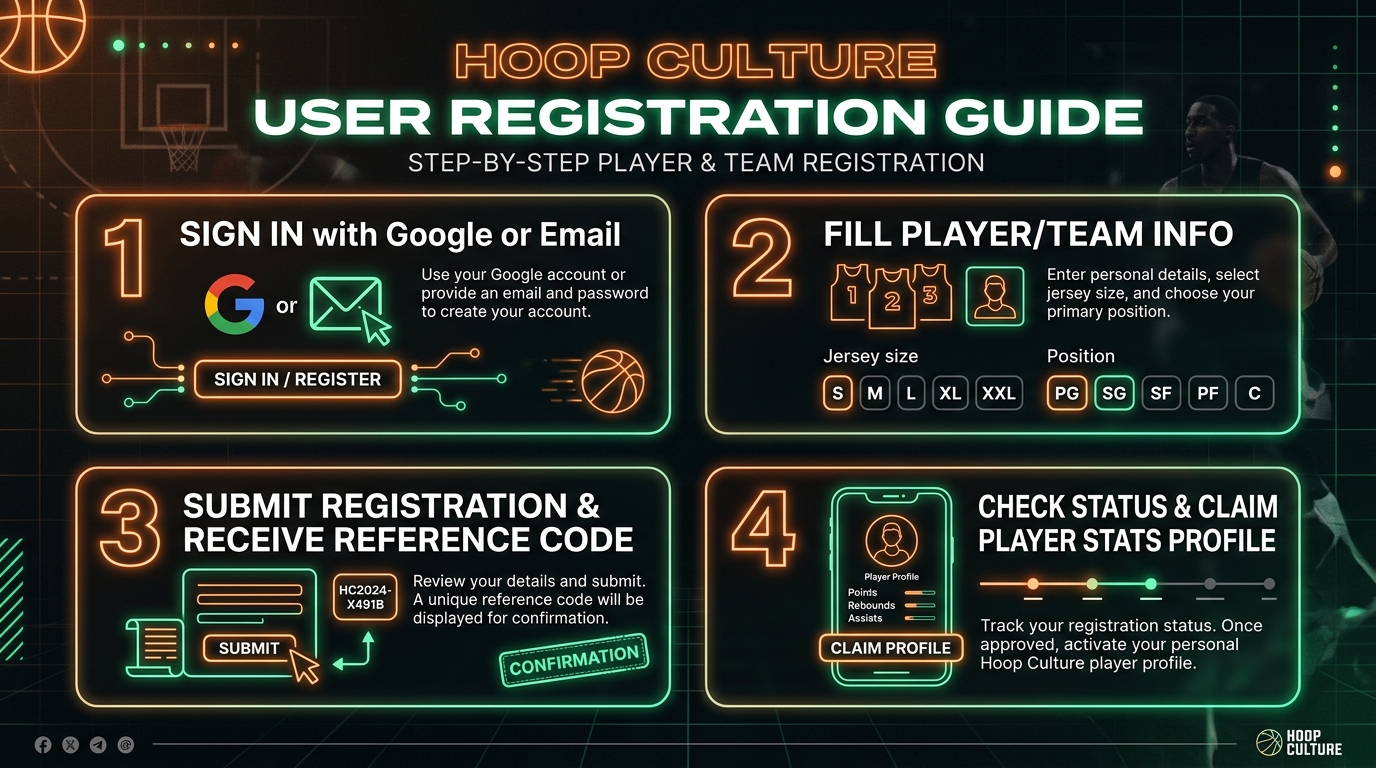
League Registrations
Player Registrations
Review incoming player sign-ups, track equipment sizes, self-ratings, payment status, and assign players to teams.
Total Registrations
0
Pending Review
0
Approved / Assigned
0
House League (Free Agents)
0
📋 Incoming Registrations
Players who completed registration on hoopculture.ca for this season
| Reg ID / Date | Player Info | Type | Jersey & Rating | Payment | Team Assignment | Actions |
|---|---|---|---|---|---|---|
| Loading registrations... | ||||||
👑 Super Admin Control Center
Commissioner Applications
Review and approve partner commissioner applications across the Hoop Culture Network.
👥 Partner Access Requests
Commissioners awaiting authorization to launch their engine database
| Applicant | League Details | Submitted | Status | Actions |
|---|---|---|---|---|
| Loading commissioner requests... | ||||
🌐 Public Portal & Registration Control
Public Portal Settings
Manage Section 1 Flagship Registration Cards, target season assignments, pricing, and multi-logo branding for
hoopculture.ca/register.html
SECTION 1 CONFIGURATOR
🏆 Hoop Culture Exclusive Portal Cards
Configure every detail of each flagship registration card shown on hoopculture.ca/register.html — add as many as you need.
⚙ LEAGUE MANAGEMENT & PARTNER CARDS
Manage Leagues & Public Cards
Manage active seasons, open/close player registrations, set cutoff dates, share public signup links, and customize Partner Card displays on
hoopculture.ca/register.htmlLoading leagues...